|
|
 發表於 2010-12-19 02:30:56
|
顯示全部樓層
發表於 2010-12-19 02:30:56
|
顯示全部樓層
how?
STANLEY2468 發表於 2010-12-19 02:17 
Hope below information can help.........
First go to internet and search for "PartedMagic". Download the ISO file and burn it to a bootable CD-R.
"I just learn & exchange from others then try and share to the others, the common rule.
Just use the iso file. 用 Nero 或其他 program , 用 (將影像檔案燒錄至光碟) this function.
Use this iso file (影像檔案) create a bootable disk. Put in the disk reboot the computer.
After boot the PartedMagic. There are 8 icons on the right bottom. Please click the most left icon on the right bottom (not those empty icons on left bottom corner), it is a hard disk icon (it looks like a XBox). When you point to this icon it will show "GParted Ghome Partition Editor".
Window show up on the left up corner and showing message "scanning all devices", after you double click this icon. After that you may find /dev/hda and /dev/sda.
dev = devices, hda = internal hard disk, sda = external hard disk.
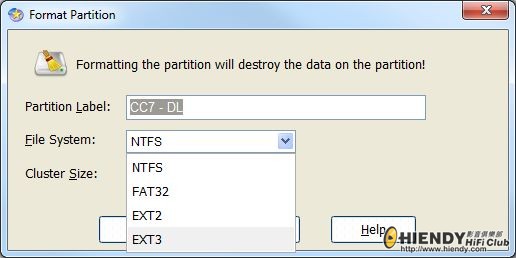
On right side of the icon command bar of that window, there are up and down arrows ↑↓, click it to change to the connected external hard disk. The horizontal bar below will show the how many G (???G) of your external hard disk. Right click this bar to place resize command, double click the √ command button to Apply All Operation. ( This resize command = create partition ) Right click this bar again to place format command, double click the √ command button to Apply All Operation.
Within 5 minutes format completed. After format completed it is no need to use window and check your hard disk again because window do not recognized EXT2/EXT3. Just disconnect it and connect it back to your MTV3000.
EXT2/EXT3 both are not window format ( This is why window always telling you the hard disk is not format ) but more steady and smooth. We do not use window NTFS because it do not recognized by our MTV3000. We do not use FAT32 because EXT2/EXT3 both are better.
MTV3000 can not help you to format a hard disk in EXT2 over 500G but MTV3000 can use a pre formatted hard disk over 500G. This is why we use PartedMagic to format because it help you to format over 500G.
If you find that both MTV3000 and your PC can read your Buffalo 640G ( I mean read the files inside the hard disk ), I doubt that you are using FAT32. ( Buffalo pre format as FAT32 before selling ).
Please connect you buffalo to your PC again make sure your window recognized your buffalo.
( I just mean to confirm the connection is OK and to find out there are one more hard disk icon in the “my computer”. It is no need to care window is telling you it is formatted or not. It is because if you had formatted that buffalo by MTV3000 in EXT2 window will tell you it is not formatted. )
Please put the bootable ParkedMagic disk in your PC, reboot your PC in ParkedMagic program environment then format the buffalo to 640G in EXT2/EXT3.
After format completed, connect it back to MTV3000 and please do not use Wondow operation System or MTV3000 to format that buffalo again.
Investigate your buffalo 640G can record 100 hours HD TV program. |
|



 IP卡
IP卡 狗仔卡
狗仔卡


 提升卡
提升卡 置頂卡
置頂卡 沉默卡
沉默卡 喧囂卡
喧囂卡 變色卡
變色卡 顯身卡
顯身卡